When businesses, marketers, restaurants, retailers, and individuals in the United States compare Static QR Code vs Dynamic QR Code, the main question is simple: should the QR code permanently contain its information, or should it point to a destination that can be changed later?
Both options are useful and serve different purposes. Understanding how each type works will help you choose the right QR code for menus, business cards, product packaging, event promotions, marketing campaigns, payments, and other everyday applications.
QR codes have become a part of everyday life in the USA. Consumers can scan them with modern smartphones without installing a separate scanner app. Businesses use them on signs, restaurant tables, printed advertisements, product labels, direct-mail campaigns, posters, event materials, and social media promotions.
The important difference is not simply how a QR code looks—it is what happens behind the code after someone scans it.
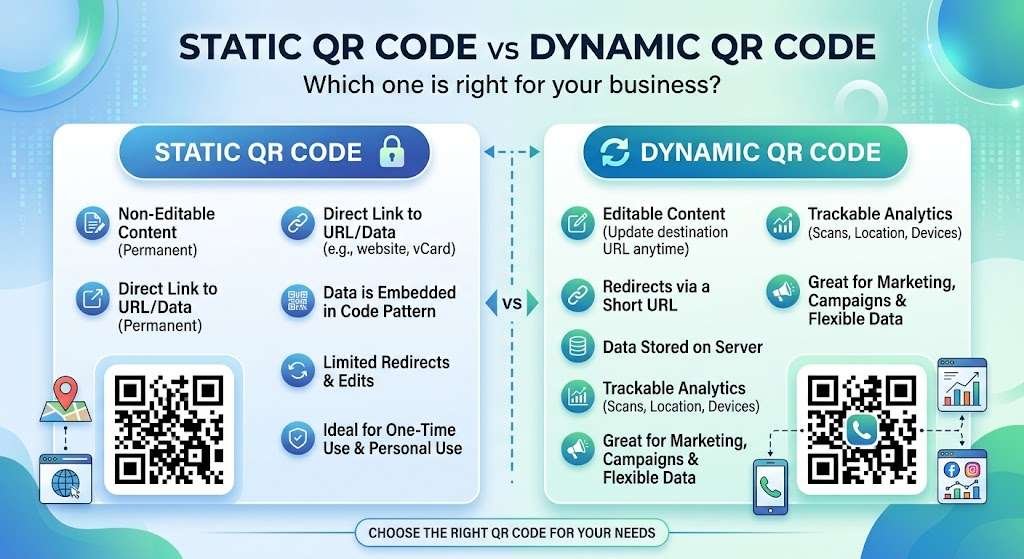
- Static QR Codes: Generally store destination information directly inside the QR code pattern itself.
- Dynamic QR Codes: Direct the scanner through a redirect URL or management service, allowing the destination to be updated without replacing the physical printed QR code.
This guide explains the differences, advantages, limitations, costs, security considerations, and practical USA-based use cases so you can make an informed choice.
What Is a Static QR Code?
A static QR code contains all information directly within the code itself. Once generated, its encoded data cannot be modified without creating a brand-new QR code.
For example, you might create a static QR code containing:
- A permanent website URL
- Plain text
- Contact information (vCard)
- Wi-Fi network credentials
- An email address or phone number
- A calendar or event link
If you print a static code on 10,000 brochures, the encoded information on those brochures remains fixed forever. For permanent information, this is extremely convenient.
For instance, a local coffee shop in Austin, Texas could place a QR code on a countertop containing its guest Wi-Fi credentials. As long as the network credentials remain unchanged, a static QR code is practical and reliable.
How Static QR Codes Work
The underlying data is encoded directly into the QR pixel pattern. When a user scans the code, their phone reads the data directly and performs the associated action:
- Website Address: The phone opens the specific web page.
- Text: The phone displays the embedded text message.
- Wi-Fi Credentials: The phone prompts the user to join the wireless network automatically.
The key characteristic of a static code is that the underlying information is fixed at generation.
What Is a Dynamic QR Code?
A dynamic QR code uses a short redirecting URL encoded into the QR pattern. That destination URL redirects users to a target web page that the owner can update anytime through a backend management system.
This means you can print the QR code today and change the destination tomorrow without reprinting the physical code.
For example, a restaurant in Chicago might print one QR code on its table cards. Throughout the year, that exact same physical code can direct customers to daily menus, happy hour specials, or holiday promotional pages depending on how the management system is configured.
Dynamic QR codes also provide robust campaign management features such as total scan counts, device types used, geographic location metrics, and time-based tracking data.
If you are looking for a reliable QR code management solution, you can explore QRCodeQuickly
for features and generation tools.
Static QR Code vs Dynamic QR Code: Core Comparison
The fundamental difference lies in what happens when you need to change the destination or measure user engagement:
| Feature | Static QR Code | Dynamic QR Code |
| Data Storage | Permanently encoded in pattern | Points to a changeable redirect URL |
| Destination Editing | Requires generating a new code | Can be updated anytime |
| Reprinting Required? | Yes, if information changes | No, physical code stays the same |
| Scan Analytics | Unavailable | Comprehensive tracking available |
| Campaign Management | Basic / None | Advanced |
| Long-Term Flexibility | Low | High |
| Best For Personal Use | Excellent | Usually unnecessary |
| Best For Marketing | Limited | Ideal |
| Cost | Free | Often involves a service subscription |
When Should You Use a Static QR Code?
Static QR codes are suitable when the underlying information is permanent and will never change.
1. Business Cards
A professional can place a static QR code on a business card to share a primary website URL or fixed contact card. If the underlying website address is permanent, an editable code is unnecessary.
2. Wi-Fi Access
Restaurants, hotels, offices, and homes frequently use static QR codes for seamless Wi-Fi onboarding when network names and passwords remain fixed.
3. Permanent Contact Information
Useful for networking materials, event badges, printed company brochures, or product documentation where details are locked in.
4. Product Manuals & Instructions
Appliance and equipment manufacturers can place static QR codes on packaging that link permanently to hosted PDF operation guides.
5. Personal Projects
Individuals running personal projects, one-time family events, or basic web links rarely need analytics or URL management, making static codes ideal.
When Should You Use a Dynamic QR Code?
Dynamic QR codes are essential when flexibility, updates, and marketing analytics are required.
1. Marketing & Advertising Campaigns
Marketing campaigns evolve continuously. A company might run a promotion linking to a seasonal landing page today and a product launch page next month without replacing printed posters or banners.
2. Restaurant Menus
Menus, pricing, and seasonal offerings change often. Dynamic QR codes allow restaurant managers to keep the same printed table cards while seamlessly altering the linked online menu.
3. Event Promotion & Management
Event organizers across major U.S. cities like New York, Los Angeles, Miami, and Dallas use dynamic codes for event schedules, ticketing, live maps, and registration pages that require real-time updates.
4. Retail Packaging & Displays
Retailers place dynamic QR codes on shelf displays, direct mail, and packaging to run rotating promotional campaigns and promotional discounts.
5. Tracking Campaign Performance
Marketing teams need visibility into campaign ROI. Dynamic systems capture vital performance metrics including:
- Total and unique scan counts
- Geographic scan locations
- Smartphone operating systems and device types
- Time and date distributions of scans
Cost Considerations in the United States
Understanding the cost structures helps budget your project properly:
- Static QR Codes: Typically free to generate and use indefinitely, as they require no central hosting or redirection server.
- Dynamic QR Codes: Usually require a monthly or annual subscription fee because the provider must maintain routing infrastructure, servers, and analytics dashboards.
What to Evaluate Before Choosing a Provider
- Monthly and annual pricing structures
- Total allowed QR codes and scan thresholds
- Real-time analytics capabilities
- Dynamic URL editing options
- Account multi-user access and permissions
- Custom logo and design options
- Privacy policies and data retention terms
Security Considerations: Protecting Your Users
QR codes are simply visual data vectors—they are inherently neutral, but security depends on the destination URL behind them.
Preventing Quishing Attacks
A growing concern in digital security is quishing (QR code phishing). Scammers overlay fraudulent QR code stickers on public posters, parking meters, or payment terminals to redirect users to malicious login pages.
Best Practices for Scanners and Businesses:
- Always check the destination URL before logging in or entering payment credentials.
- Be cautious if a destination page asks for sensitive information like passwords, credit card numbers, or Social Security numbers.
- Businesses must secure their QR management account credentials using strong passwords and multi-factor authentication (MFA) to prevent unauthorized target URL changes.
QR Codes and Privacy Regulations
When leveraging dynamic QR analytics in the United States, privacy regulations come into play. Collecting user data (like location or IP address details) introduces legal responsibilities.
Businesses should review state-level privacy standards (such as CCPA/CPRA in California) and verify how their QR platform vendor handles, retains, and secures collected visitor information.
Design Tips for Maximum QR Code Scannability
Regardless of whether you choose a static or dynamic framework, your code must scan reliably across all devices:
- Maintain Strong Contrast: Always use a high-contrast design (such as a dark foreground pattern on a light background).
- Preserve the Quiet Zone: Leave ample clear, unprinted space surrounding the outer edges of the QR code.
- Avoid Over-Decoration: While custom brand colors and embedded logos look attractive, excessive elements can render the code unreadable by older camera lenses.
- Test Before Mass Printing: Test the code across multiple iOS and Android devices under varying light conditions and distances before initiating large print runs.
- Include a Clear Call to Action (CTA): Give users a reason to scan by adding concise text next to the code (e.g., “Scan to view digital menu” or “Scan for 15% off”).
Frequently Asked Questions
What is the main difference between static and dynamic QR codes?
Static QR codes store destination data directly in the pixel pattern and cannot be edited once created. Dynamic QR codes point to a short redirect URL, allowing you to edit the destination page anytime without reprinting the code.
Are static QR codes completely free?
Yes, static QR codes are generally free to create and use forever because they do not rely on ongoing cloud routing servers or tracking databases.
Can I edit a static QR code after printing?
No. Because the raw data is permanently written into the static visual pattern, changing the destination requires generating and printing an entirely new QR code.
Do dynamic QR codes expire?
A dynamic QR code remains functional as long as the underlying redirection account and hosting subscription remain active with the service provider.
Which QR code type is best for a business card?
If you are linking to a permanent personal website or standard contact details, a static QR code is usually sufficient. However, if you plan to update your portfolio or digital contact page in the future, a dynamic code offers more flexibility.
Conclusion
Understanding Static QR Code vs Dynamic QR Code is important before putting a QR code on a business card, menu, product package, advertisement, poster, or other printed material. Static codes are straightforward for information that does not need to change, while dynamic solutions can provide greater flexibility when destinations, campaigns, or marketing requirements evolve.
For a simple permanent website link, contact information, or Wi-Fi details, a static QR code may be enough. For campaigns where you want to change destinations or monitor scan activity, a dynamic solution can offer additional functionality.
The most practical approach is to start with your specific use case, expected lifespan, printing requirements, analytics needs, privacy considerations, and budget. Once those factors are clear, selecting the appropriate QR code type becomes much easier.
One Response