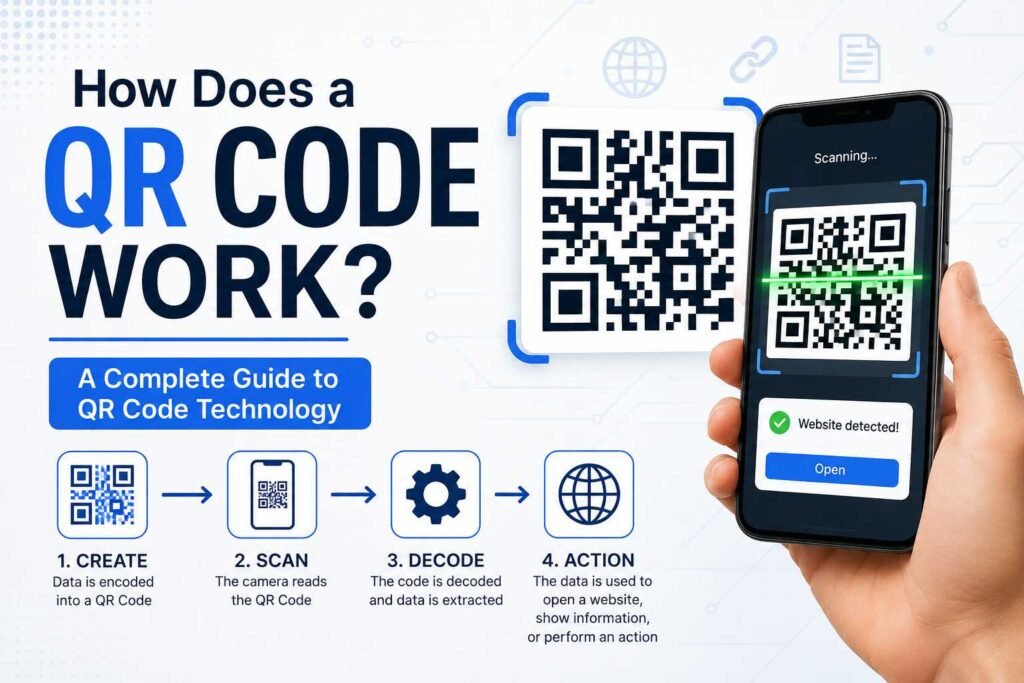
If you have ever scanned a QR code to open a website, make a payment, view a menu, download an app, or access information, you may have wondered: how does a QR code work? These small square patterns have become a part of everyday life, appearing on product packaging, restaurant tables, advertisements, event tickets, business cards, posters, and receipts. Although a QR code may look like a random collection of black-and-white squares, it contains structured information that a smartphone camera can recognize and decode within seconds.
QR codes are designed to make accessing information quick and convenient. Instead of typing a long web address or manually entering information, a user can simply point a smartphone camera at the code. The device analyzes the pattern, interprets the encoded data, and presents an action—such as opening a website or displaying text.
This technology has become increasingly useful for businesses, marketers, educators, event organizers, restaurants, retailers, and everyday consumers. Understanding the technology behind QR codes can help you use them effectively and recognize their benefits and limitations.
What Is a QR Code?
QR stands for Quick Response. A QR code is a type of two-dimensional barcode capable of storing information in a visual pattern that can be read by compatible cameras and scanning software.
Traditional barcodes generally store information horizontally in a single dimension and are commonly used for basic product identification. QR codes use both horizontal and vertical dimensions, allowing them to store considerably more data in a compact format.
A typical QR code contains small squares called modules. These modules represent encoded information. The scanner interprets the arrangement of dark and light areas and converts that pattern into usable data.
Depending on how it is created, a QR code can store:
- Website URLs
- Plain text
- Contact information (vCards)
- Email addresses
- Phone numbers
- Wi-Fi network credentials
- Payment details
- Application download links
- Geographic location coordinates
- Event details and calendar invites
- Social media profiles
How Does a QR Code Work?
At a basic level, how a QR code works can be explained through three main stages: encoding, scanning, and decoding.
- Encoding: Information is converted into a machine-readable format. A QR code generator takes the input data and transforms it into a matrix pattern of modules.
- Scanning: A smartphone camera or dedicated application captures the code. The scanner identifies the structural components of the QR code and determines where the encoded data is located.
- Decoding: Software interprets the pattern and converts it back into actionable data. If the code contains a URL, for example, the device prompts the user to open the link in a browser.
This entire process typically takes less than a second.
How Information Is Stored in a QR Code
A QR code does not store information like a standard text document. Instead, data is represented using a grid-based binary arrangement of modules, where dark squares represent 1s and light squares represent 0s.
Specific parts of the grid allow the scanner to orient the symbol, while other sections contain the payload data and error-correction codes. Because the design adheres to standardized global specifications (ISO/IEC 18004), any compatible scanner can interpret QR codes created by different generators.
The Important Parts of a QR Code
To better understand how a QR code works, it helps to examine its key structural components:
Finder Patterns
The three large squares located at the top-left, top-right, and bottom-left corners are finder patterns. They tell the scanner where the boundary of the QR code is and allow it to read the code accurately, even if the image is rotated or tilted.
Timing Patterns
Alternating black and white modules connecting the finder patterns form the timing patterns. These establish the grid size and help the scanner determine how large individual modules are across the matrix.
Alignment Patterns
Smaller squares embedded inside larger QR codes act as alignment patterns. They ensure the scanner can decode the image accurately even if the code is printed on a curved surface or captured at an angle.
Data Modules
The remaining area of the matrix consists of data modules. These contain the actual payload (the encoded message) alongside error-correction code blocks.
Quiet Zone
The blank space surrounding the outer edge of the QR code is the quiet zone. It provides visual contrast, preventing surrounding text or graphics from interfering with the scan.
Why Can QR Codes Be Scanned From Angles?
QR codes are engineered to remain readable even when not perfectly aligned with the camera. The finder patterns allow scanning software to establish the coordinate plane of the code instantly. Modern image processing algorithms then automatically adjust for tilt, rotation, and minor lens distortion.
However, extreme conditions—such as severe physical damage, poor lighting, heavy motion blur, or low contrast—can still prevent a successful scan.
What Is Error Correction in a QR Code?
One of the key strengths of QR technology is built-in Reed-Solomon error correction. This allows a scanner to reconstruct missing or damaged data if part of the code is obscured or worn away.
There are four primary levels of error correction:
- Level L (Low): Restores up to 7% of damaged data.
- Level M (Medium): Restores up to 15% of damaged data.
- Level Q (Quartile): Restores up to 25% of damaged data.
- Level H (High): Restores up to 30% of damaged data.
Higher error correction levels make the code more resilient, though they require a denser grid with more modules to store the redundant data. This feature allows businesses to place custom logos or images in the center of a QR code without breaking its functionality.
Static vs. Dynamic QR Codes
When learning how QR codes function, it is essential to distinguish between static and dynamic types.
Static QR Codes
In a static QR code, the target data is hardcoded directly into the module pattern. Once printed, the destination or information cannot be modified. Static codes do not expire and do not rely on an external redirection server.
Dynamic QR Codes
Dynamic QR codes encode a short redirect URL rather than the final destination payload. When scanned, the request passes through an intermediary service before sending the user to the target page.
This offers two main benefits:
- The final destination URL can be changed at any time without reprinting the physical code.
- The intermediary service can track scan analytics, such as total scans, time of scan, device operating system, and general geographic region.
How Does a Smartphone Read a QR Code?
When you point your camera at a QR code, the device executes several quick background steps:
- Image Capture: The camera sensor streams a live video feed or frame.
- Pattern Recognition: The software identifies the three corner finder patterns to isolate the code boundary.
- Grid Analysis: The app measures module density using the timing and alignment patterns.
- Data Extraction: Data bits are read, decoded, and checked against the error-correction algorithm.
- Action Execution: The operating system presents an appropriate prompt based on the content type:
- URL: Prompts to open in a web browser.
- vCard: Prompts to save a new contact.
- Wi-Fi: Prompts to join the local network.
- Text: Displays the string on screen.
Do QR Codes Need an Internet Connection?
Not inherently. An internet connection is only required if the content stored inside the QR code relies on online resources.
- Offline Use Cases: Displaying plain text, loading contact cards, revealing serial numbers, or connecting to local Wi-Fi networks do not require active cellular or Wi-Fi data.
- Online Use Cases: Opening web pages, streaming media, making online payments, or downloading apps require active internet access.
Are QR Codes Safe?
The QR code format itself is inherently safe—it is simply a data delivery mechanism. However, risks arise based on where the code directs the user.
Malicious actors can print fraudulent QR codes (a practice known as QRishing) and paste them over legitimate codes on public posters, parking meters, or restaurant menus to redirect users to phishing sites or malware downloads.
Security Best Practices:
- Preview the destination URL on your phone screen before tapping to open it.
- Avoid entering sensitive login or payment credentials on pages accessed via unexpected public QR codes.
- Inspect physical QR stickers on public infrastructure to ensure they haven’t been pasted over an original print.
Common Uses of QR Codes
QR technology spans many consumer and enterprise applications:
- Restaurants: Digital menu access and contactless table ordering.
- Payments: Direct peer-to-peer or point-of-sale merchant transfers.
- Marketing: Print-to-digital bridges on billboards, flyers, and magazine ads.
- Event Management: Mobile ticketing and rapid attendee check-ins.
- Product Packaging: Digital user manuals, warranty registrations, and supply chain traceability.
- Networking: Digital business cards and social profile sharing.
- Education: Supplemental learning materials linked directly from physical textbooks.
Why Are QR Codes So Popular?
The widespread adoption of QR codes comes down to five core factors:
- Convenience: Eliminates manual typing of long URLs or complex data.
- Low Cost: Free to generate and low-cost to print on existing materials.
- Versatility: Supports multiple content types across various industries.
- Native Integration: Built directly into standard mobile OS camera apps without requiring third-party software downloads.
- Bridge to Digital: Instantly converts offline physical attention into online digital engagement.
How to Create a QR Code
Creating a QR code involves four basic steps:
- Select Data Type: Decide whether you are linking a URL, plain text, Wi-Fi access, or contact information.
- Choose a Generator: Input the information into a reputable online QR code generator.
- Customize Design (Optional): Adjust contrast colors, frame styles, or add a brand logo if using sufficient error correction.
- Test Across Devices: Always scan the generated code using multiple smartphone camera models and OS versions before printing at scale.
Tips for Making a QR Code Easy to Scan
To ensure reliable performance across all scanning devices:
- Maintain High Contrast: Use dark modules on a light background. Inverting colors (light modules on a dark background) can confuse some standard scanners.
- Preserve the Quiet Zone: Ensure ample blank space surrounds the outer edges of the code.
- Avoid Over-Customization: Keep logos centered and modest in size so key data modules remain unobstructed.
- Scale Appropriately: Increase the physical size of the printed code if it is intended to be scanned from a distance.
- Test the Final Print: Always run a scan test on the actual physical material (e.g., matte paper, glossy plastic, or metal) under real lighting conditions.
Can a QR Code Stop Working?
Whether a QR code stops working depends on how it was created:
- Static Codes: These never expire automatically because the data is permanently encoded into the matrix. They will work as long as the code remains physically legible and the target destination (like a web server) remains active.
- Dynamic Codes: These can stop working if the hosting platform redirects the link, if an account subscription lapses, or if the campaign destination URL is altered or taken down.
What Happens If a QR Code Is Broken?
Because QR codes feature built-in Reed-Solomon error correction, minor physical damage—such as light scratches, dirt, or slight tearing—will generally not prevent the code from working. The scanner uses redundant data blocks to calculate and restore the missing bits.
However, if damage affects critical components like the finder patterns, or if the corruption exceeds the error correction threshold (up to 30%), the scanner will fail to process the code.
The Future of QR Code Technology
As mobile operating systems evolve, QR codes continue to integrate with emerging technologies. Modern applications include connecting users to Augmented Reality (AR) experiences, multi-factor authentication systems, secure digital IDs, encrypted supply chain tracking, and personalized shopping interactions.
Their underlying simplicity, paired with near-universal smartphone compatibility, guarantees that QR codes will remain a primary bridge between the physical and digital worlds.
Frequently Asked Questions
How does a QR code work on a phone?
A smartphone camera captures the visual matrix and identifies the corner finder patterns. Internal software analyzes the black-and-white grid, converts the module arrangement into binary data, applies error correction, and prompts the user with the decoded action.
Can a QR code hold a lot of data?
Yes. Depending on the version and configuration, a QR code can store up to 7,089 numeric characters, 4,296 alphanumeric characters, or 2,953 binary bytes—far exceeding standard one-dimensional barcodes.
Do I need a third-party QR scanner app?
No. Most modern iOS and Android devices feature native QR code scanning built directly into the default camera app.
Can QR codes work without Wi-Fi or cellular data?
Yes, for offline payloads like plain text, Wi-Fi passwords, or vCards. However, opening external websites or processing online payments requires active internet access.
Do static QR codes expire?
No. Static QR codes do not have an expiration date. They remain functional indefinitely as long as the printed image remains legible and any underlying web link stays active.
Can I customize the appearance of a QR code?
Yes. You can alter colors, round module corners, and insert logos. However, you must maintain high visual contrast and avoid obscuring the finder patterns or exceeding the error correction limits.
Why won’t my QR code scan?
Common causes include low contrast, poor lighting, glare on reflective surfaces, dirty camera lenses, insufficient quiet zones, overly dense data matrices, or physical damage.
Are QR codes safe to scan?
Scanning a QR code itself is harmless, but the destination link could be malicious. Always verify the destination URL preview before proceeding to enter personal details or download files.
Conclusion
QR codes are one of the most effective tools for connecting physical touchpoints with digital experiences. From restaurant menus and event ticketing to instant payments, product packaging, and digital business cards, they allow users to access content seamlessly with a simple smartphone scan.
Understanding how a QR code works demystifies the matrix: it relies on structured geometric patterns, orientation markers, and built-in error correction to store machine-readable data. Combined with universal mobile camera support and flexible deployment options, QR codes remain an essential, practical technology for sharing information efficiently.
2 Responses